I recently came across an issue that took some time trying to resolve regarding 802.1x configuration on ThinOS 9.1 that I wanted to share.
Ultimately, the issue came down to the SSL certificate name not matching the certificate name entered into the Wyse Management Suite (WMS) configuration.
When the device was trying to authenticate, it was using a certificate name that didn’t match what was in the WMS configuration and failed to authenticate because of this.
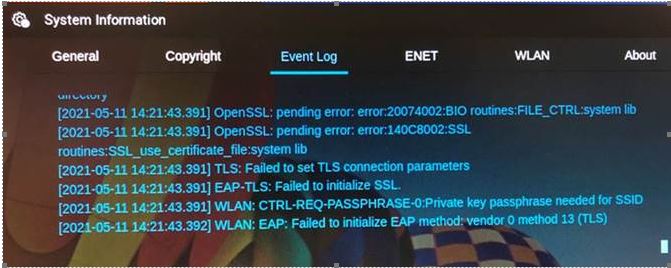
Some errors we received in the event log but weren’t very descriptive although it appeared to be a certificate authentication issue based on ‘private key passphrase needed for SSID’ error message.
- TLS: Failed to set TLS connection parameters
- EAP-TLS: Failed to initialize SSL
- WLAN: CTRL-REQ-PASSPHRASE-0:Private key passphrase needed for SSID
- WLAN: EAP: Failed to initialize EAP method: vendor 0 method 13 (TLS)
Example log:
We then looked at the WMS 802.1x configuration and verified the certificate name, in this case, ‘wyse.pfx’ – note the lowercase ‘w‘. We uploaded again to WMS and verified we got prompted for password so that looked correct.
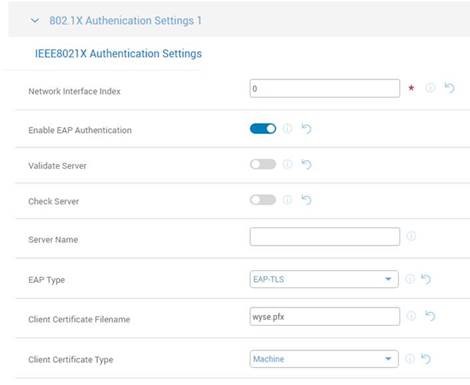
We then looked at actual certificate we uploaded, ‘Wyse.pfx’, and made note of the case – capital ‘W‘ vs the lowercase ‘w‘ that was entered in WMS console so we changed WMS to match certificate name. We changed it from ‘wyse.pfx’ to ‘Wyse.pfx’. Once we did this and rebooted device, it connected to the network successfully!
Lesson learned, it’s never a bad idea to verify case sensitivity and try to make sure they match to avoid this potential pitfall!

Hope you found this helpful!
Additional Resources:
- More details on 802.1x configurations noted here
- If you are new to ThinOS 9.1, here is a quick video overview of some of it’s features.
- Looking for more details on ThinOS 9.1? Check out the release notes here
- Excellent Dell Wyse community located here
- Dell Community forums for ThinOS here
@chris_messier ~~> Subscribe to blog to get latest updates <~~
 VDI Toolbox
For anyone trying to troubleshoot SCEP certificates and wireless EAP-TLS…this blog post about case sensitivity lead me to my particular problem. Mine was not JUST case sensitivity, but the SCEP certificates generated for ThinOS 9.x are not .pfx, but are .crt.
Great post Chris!
LikeLiked by 1 person
Please Sir I will love to get Wyse ThinOS Lite (Xenith) firmware
LikeLike
Chiming in on an old thread, but hoping someone has seen what we are and has a possible tip. We autologin our ThinOS 9 terminals to a Horizon VDI environment where they get a desktop from our floating pool. We’re trying to introduce 802.x on our wired devices, but it seems like the auth to get connectivity sometimes (often times) happens AFTER the terminal comes up and tries to login to Horizon. Since it has no network connectivity, it bombs, and then the terminal stays at the Horizon login. Kind of a cart before the horse issue. Trying to see if we can speed up the 802.x auth, or even Horizon not launch until connectivity is established. So far no luck. Did open a ticket with Dell as well.
Thanks.
-Ed
LikeLike
Hey Ed, I’ve seen cases where the network, 802.x or not, was not up before the broker login attempt occurred. In some cases it was spanning tree not negotiating on the switch in time and ThinOS attempted connection too fast. I saw a new setting to ‘Delay Auto Login in Seconds’ under Login ExperienceLogin SettingsDefault Credentials – Delay Auto Login in Seconds – so perhaps see if that helps?
LikeLike
Thanks for the reply, Chris. We actually just happened upon that setting as well, and after a WMS upgrade along with firmware upgrade, indeed it fixes the Horizon issue for us. HOWEVER, we’ve unfortunately happened upon a bigger issue. It seems that the normal initial check in process at boot to WMS is being missed/skipped because 802.x hasn’t fully initialized. Where this causes us a problem, is we specify the terminals to upgrade firmware on reboot. Since they’re not checking in fully, but still proceeding with their startup, they never end up pushing the firmware. We are continuing the SR with Dell. As I said we’ve made progress for the Horizon piece, but this new WMS check in problem is a bit more concerning. I’ll update further as we go.
LikeLike